

Google Analytics and Google Search Console are both free, and between them they tell you almost everything you need to know about your website. Most small businesses either don't have them, or have them in an account that belongs to whoever built the site years ago.
Here's what each one does, how to set them up in your own name, and how to give your web team access without giving away ownership.
What each tool tells you
- Google Analytics shows what happens on your site: how many people visit, where they come from, which pages they read, and whether they call, book or fill in a form.
- Google Search Console shows what happens before they get there: which searches you show up for, how often people click, and whether Google can find and read your pages.
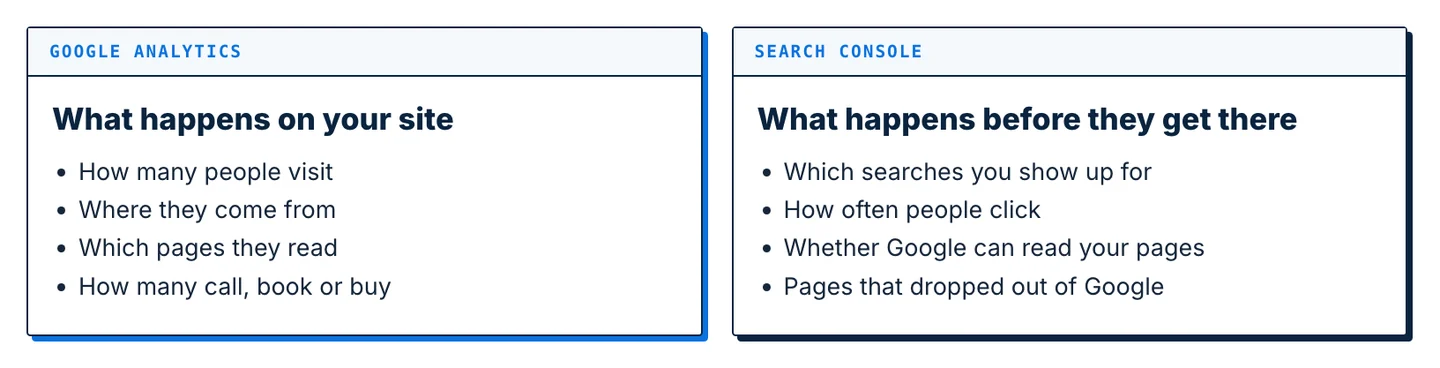
You want both. Analytics tells you if the site works. Search Console tells you if Google can see it. If new pages stop showing up in Google, Search Console is the first place to look.
Use a Google account you'll always have
Set both up under a Google account that belongs to the business and that you control. Not your web designer's, not an employee's, and ideally not a personal Gmail you might abandon. If you use Google Workspace for email, use that.
Set up Google Analytics
- Go to analytics.google.com and create an account for your business.
- Create a property for your website, and choose a web data stream with your site's address.
- Copy the tag or measurement ID it gives you. Your web designer adds it to the site, or your WordPress SEO plugin does it with a setting.
- Mark the actions that matter, like form submissions or calls, as key events, so you can count leads, not just visitors.
Set up Search Console
- Go to search.google.com/search-console and add your site.
- The domain option covers every version of your site and is verified by adding one DNS record at your registrar. If that's not something you want to touch, the URL option can be verified with a tag on the site instead.
- Submit your sitemap, usually yoursite.com/sitemap.xml.
Add your web team
Add people to each tool with their own Google account. Never share your login.
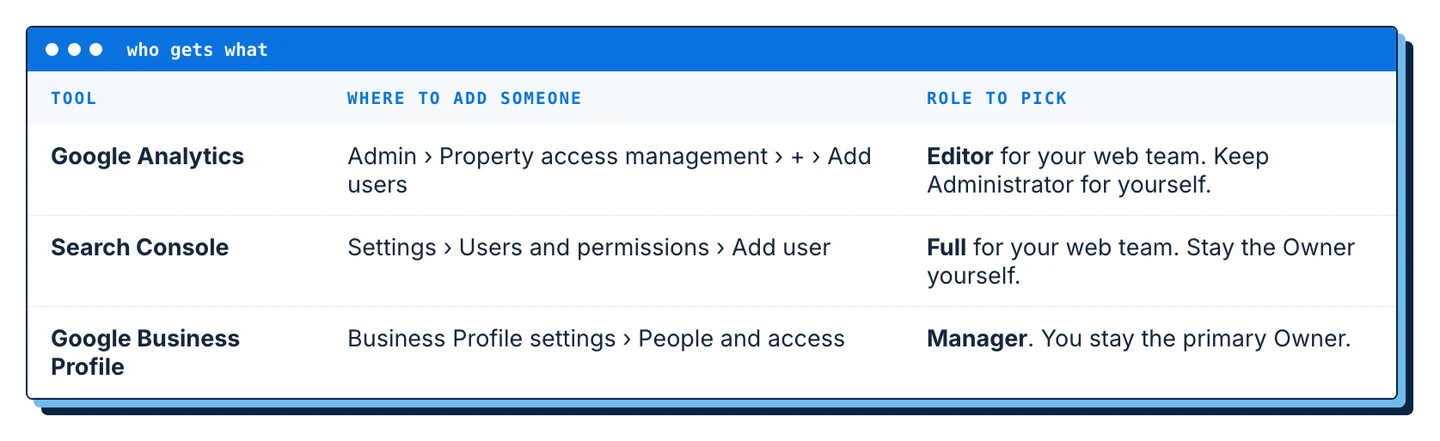
- Google Analytics: Admin, then Property access management, then the plus button and Add users. Give your web team the Editor role. Keep Administrator for yourself.
- Search Console: Settings, then Users and permissions, then Add user. Give your web team Full permission. You stay the owner.
- Google Business Profile works the same way, with a Manager role. I cover it in how to set up your Google Business Profile.
How not to get locked out
- Keep at least two owners or administrators you trust on each tool, both with business accounts.
- Turn on two-step verification on the Google account.
- When someone leaves, remove their access the same day.
- If an old agency owns your Analytics or Search Console, ask them to add you as an administrator or owner, then make the switch yourself.
What to look at once it's running
Five minutes a week is enough: visitors, where they came from, and how many took the action you care about. Then once a month, open Search Console's Pages report to make sure nothing important has dropped out of Google. I wrote about which numbers matter in what small business owners should actually track.
Not sure whether your pages are set up to be found at all? The free SEO page audit checks one page in a minute.