

CRM stands for customer relationship management, which makes it sound bigger than it is. It's a list of people, what they want, and what you promised to do next, with something to nudge you when you forget.
Plenty of small businesses buy one they don't need yet. Plenty of others run on memory for too long.
Do you need one yet?
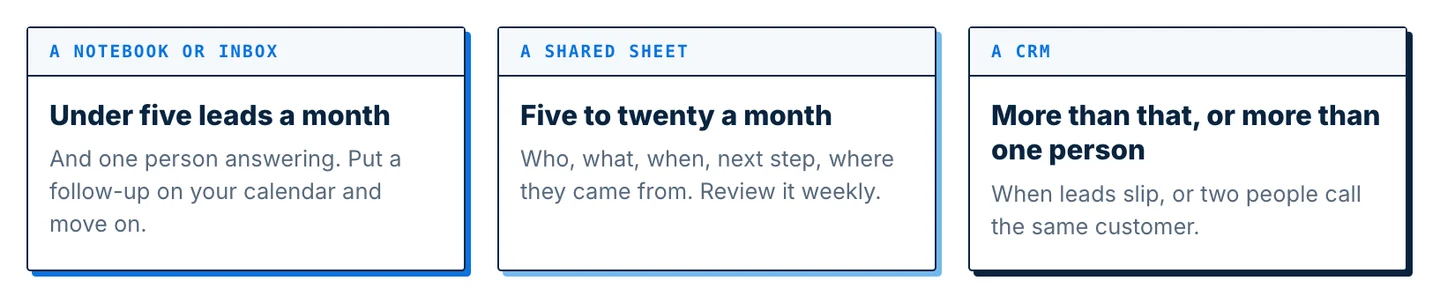
A spreadsheet is a perfectly good answer for a while. For one client's annual awards program, every nomination that comes through the website lands in a Google Sheet the team works from. It isn't fancy, and it replaced digging through email.
You've outgrown the sheet when two people call the same customer, when quotes go out and nobody follows up, or when you can't say how many leads you got last month.
The five things it has to hold
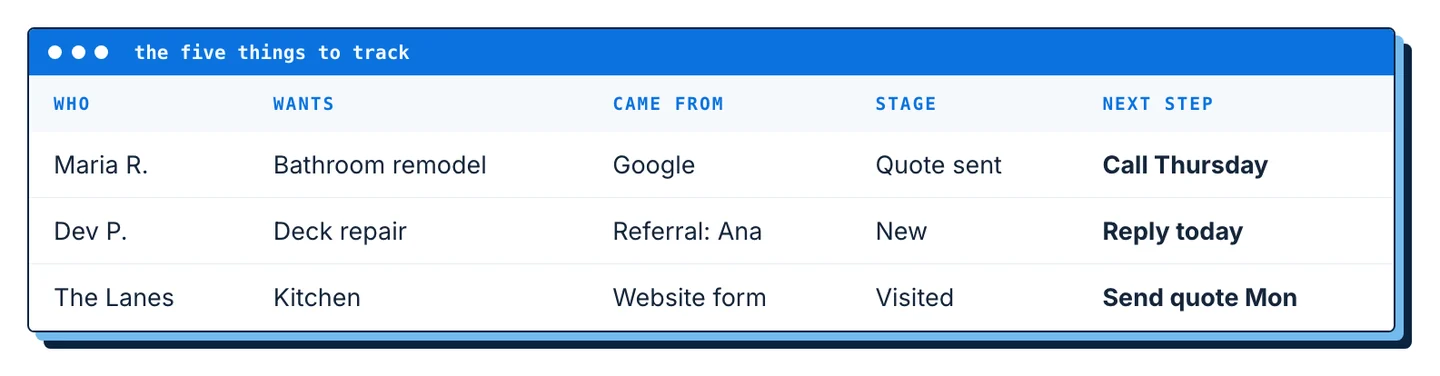
The last column is the one that makes money. A lead without a next step and a date is just a name.
What to look for
- Forms go straight in. If you have to copy and paste, you'll stop.
- It reminds you on your phone.
- It shows the whole conversation, so anyone can pick it up.
- You can text or email from it, or it logs what you send.
- You can get your list out. Try the export during the trial.
And what to ignore, at least for the first year: lead scoring, fifty-step automations, and anything that needs a consultant to turn on.
What you're really paying for
Many have a free plan, and the free plan is often enough to find out whether you'll use it. The paid parts are usually the same few things: more users, automation, sending a lot of email, and removing the company's branding. Prices change constantly, so price it for the number of people you'll have in a year. Also look at what happens to your data if you stop paying.
Pick by how you work
- Mostly phone and text, in the field: choose the one with the best phone app.
- Mostly appointments: your booking tool may already have a simple CRM inside.
- Mostly quotes and projects: look for a pipeline you can drag.
- Already living in a tool your team likes: a database there may be all you need.
Connect it to the website
This is the step that makes it stick. Each form should create a contact, fill in where it came from, and trigger a short automatic reply. Mine work that way: when someone downloads my checklist, they land in one list with the source already filled in. You can do this with a built-in connection, a connector tool, or a bit of code.
Then test it. Fill in your own form and follow your own name all the way through.
Move in gently
Don't import ten years of contacts. Bring the open quotes, the last year of customers, and anyone you'd be sad to lose. Clean those up, use it for a month, and then decide about the rest.
If you're copying things between systems by hand already, read how to stop copying data between QuickBooks and your CRM.