

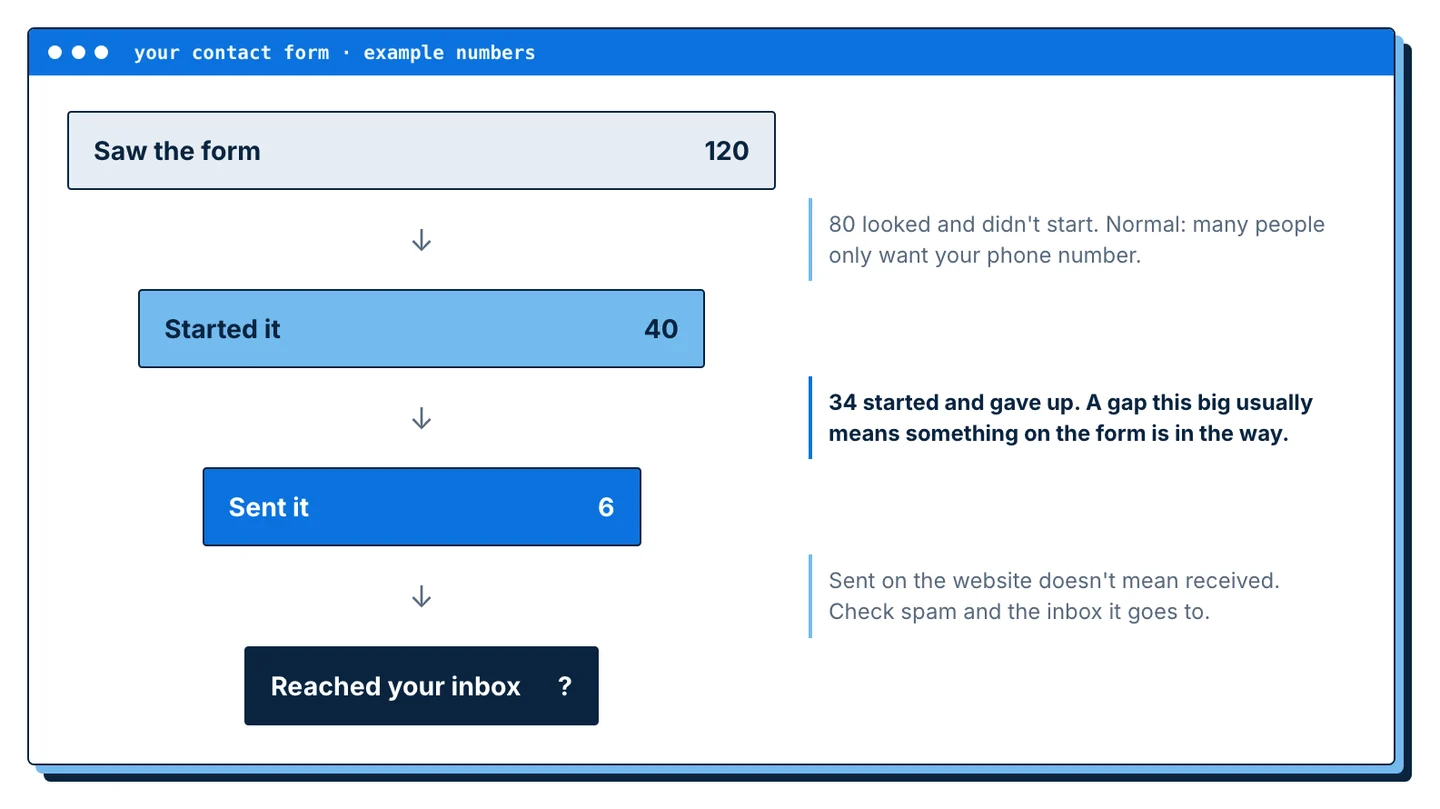
If I could see only two numbers about a small business website, I'd pick these. How many people started the contact form, and how many sent it.
Visitors tell you people showed up. These two tell you whether the most important thing on your site actually works.
What each number means
- A form start is someone clicking into your form and typing something.
- A form submission is someone pressing send and the form going through.
The difference between the two is people who wanted to reach you and gave up partway. They aren't browsing. They chose your business, started telling you what they need, and stopped.
How big a gap is normal?
Some people will always start and stop. The phone rings, or they decide to call you instead. So don't expect every start to turn into a submission.
What I look at is the shape. If most starts become submissions, the form is fine. If only a small share do, something on the form is in the way. And if you see starts but no submissions at all for a couple of weeks, assume the form is broken until you prove it isn't.
What usually causes a big gap
- Too many boxes. Every extra field is one more reason to stop. A name, a way to reach them and what they need is enough to start a conversation.
- A question people aren't ready to answer, like an exact budget or a home address. If you need it, ask for a range or make it optional.
- A form that fights the phone: tiny boxes, a date picker that won't open, a send button hidden under the keyboard.
- Error messages that don't say what's wrong, or that clear everything they typed.
- A spam check that blocks real people.
- A send button that doesn't look like a button.
The gap you can't see: sent, but never received
There's one more step after the submission. The message has to reach you. A form can go through on the website while the email lands in spam, or in an inbox nobody has checked since the last office manager left.
So I never trust a submission count on its own. Many form tools can keep a copy of every entry in your website's dashboard. If yours does, compare those entries with the emails you actually got, once a month.
How to count starts and submissions
Google Analytics can count both. In the settings for your website's data stream there's a section called enhanced measurement, and inside it a switch for form interactions. Turn it on and Analytics starts recording form starts and form submissions.
It doesn't work with every kind of form. Some forms send without leaving the page, and Analytics can miss them, or count a send that failed. So after you switch it on, send a test and check that both numbers moved.
If it can't count your form reliably, your web designer can count it another way, for example by tracking visits to a thank-you page that only appears after a form is sent.
Turning on more tracking changes what your site collects. Before you do, it's worth knowing what it collects now. I wrote about how to find that out in 15 minutes.
A five-minute monthly test
- Pick up your phone, not your laptop.
- Fill in the form the way a customer would, and press send.
- Check the email arrived. Check spam too.
- Note anything that was slow or annoying.
- Put the same test in your calendar for next month. Forms break quietly, often after an update nobody noticed.
What to do with your own site:
- Switch on form tracking, send a test, and make sure both numbers went up.
- Cut every field you don't need to start the conversation.
- Send yourself a test from your phone once a month.
For what belongs on the page around the form, read how to build a contact page that actually gets messages. Or run the free website gap checker on your site. It scores ten things, including whether someone can reach you quickly on a phone.