

A website report is only useful if you know where to start. Most people start at the top, see that visitors went down, and close it.
Here's the order I read one in. It takes about ten minutes, and it ends with one thing to do.
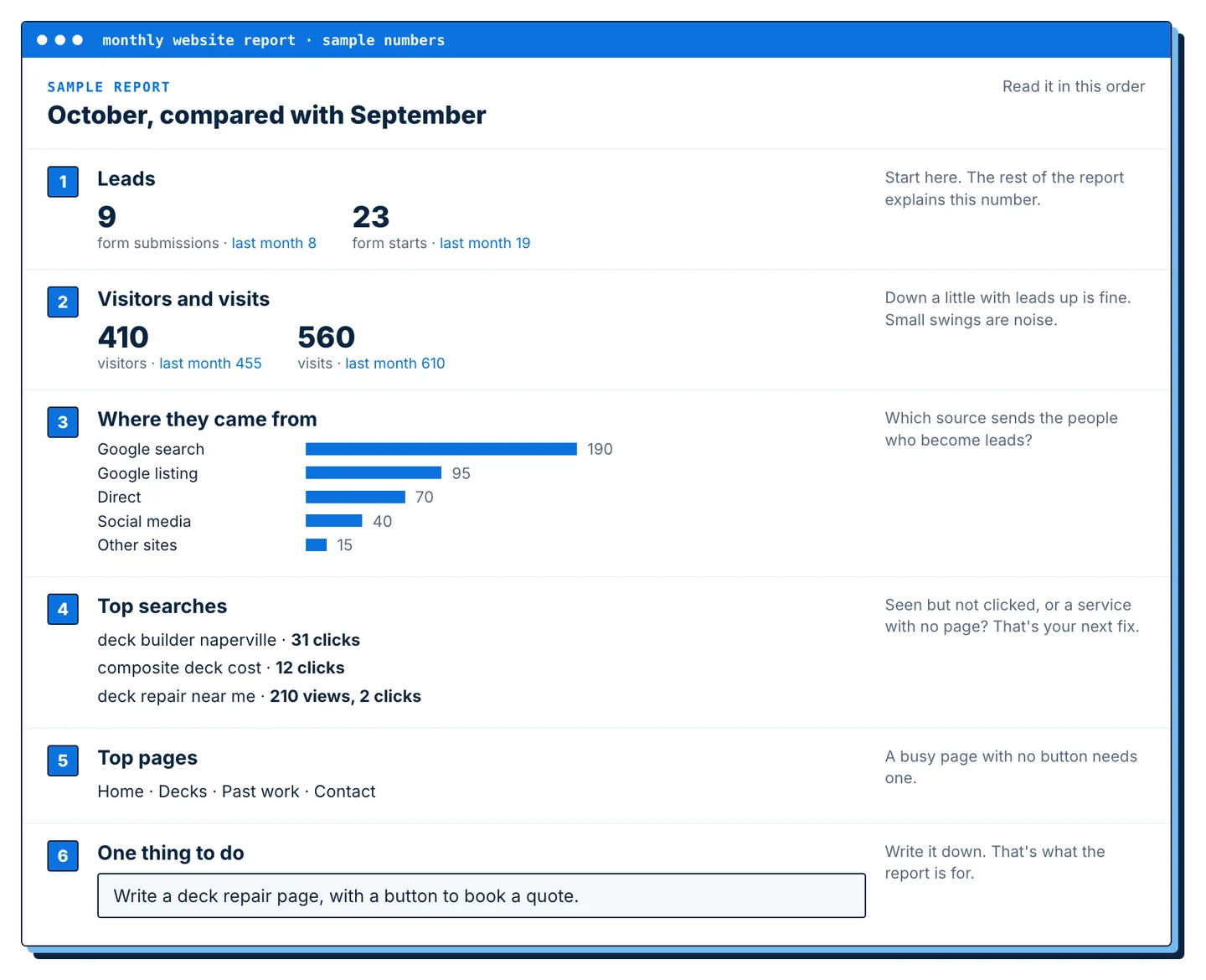
Minute 1: Leads
Start with what the site is for. Form submissions, calls and bookings. Everything else in the report is there to explain this number.
If leads are steady or up, the rest of the report is about finding more of what's working. If they dropped, the rest of the report is about finding out why.
Minutes 2 and 3: Compare it fairly
Compare each number with last month, and with the same month last year if you have it. A landscaper's January will always lose to June. Comparing with the same month last year takes the season out of it.
Then look at the size of the change, not the percentage. On a small site, percentages exaggerate. Four leads last month and two this month is a 50% drop. It's also two people. Look at the last three months together before you decide something changed.
Minute 4: Visitors and visits
Visitors are people. Visits are trips to your site. One person who comes back three times is one visitor and three visits. Google Analytics calls them users and sessions.
More visitors with flat leads usually means one of two things. The new visitors aren't the right people, or they're landing on a page with no clear next step.
Minute 5: Where they came from
Google search, your Google Business Profile, social media, other websites that link to you, and direct. Direct means someone typed your address, used a bookmark, or came from somewhere Analytics couldn't identify, like some email and chat apps.
The useful question isn't which source sends the most people. It's which source sends the people who become leads.
Minutes 6 and 7: What people searched
This part comes from Google Search Console. It lists the searches where your site appeared and how many people clicked.
Look for two things:
- Searches where you're seen a lot but rarely clicked. That can mean you're low on the page, or your page title doesn't match what they wanted.
- Searches for a service you offer but don't have a page about. That's your next page. My post on local keyword research shows how to build on it.
Minutes 8 and 9: Your top pages
Which pages people read most. Your home page will usually be first. The interesting ones are second and third.
If a page gets plenty of visits and has no button on it, add one. If an important page is missing from the list, people probably can't find it. Check your menu and the links pointing to it.
Minute 10: Write one thing down
Finish with one sentence: what you'll do this month because of what you read. Fix the form. Write the page people are searching for. Add a button to the page everyone reads.
One small change every month adds up faster than a perfect dashboard nobody acts on. That's the whole reason to read it.
When to worry, and when not to
- Worry: leads drop to zero, or form starts keep coming but submissions stop. Something may be broken. Test it today. I explain how in form starts vs form submissions.
- Worry: clicks from Google fall off a cliff in a week. A page may have dropped out of Google. Check the Pages report in Search Console.
- Don't worry: one quiet month after a busy one, a holiday dip, or a small swing on small numbers.
Search Console says a page gets seen but not clicked? Run it through the free SEO page audit. It shows your Google preview and what to fix first.