

Most people decide in a few seconds whether to stay on your home page. In that time they need two answers: what is this, and what do I do next? Everything else on the page is there to make the second answer feel safe.
Here's the order I use for almost every small business home page, a real before and after, and what to put in each part.
A real before and after
Kim Kalman is a singer and acoustic guitarist on the Outer Banks of North Carolina. She plays weddings, private events, memorial services and home concerts. Her home page opened with her name, a beautiful photo and a line about music: "Music gives us permission to heal, laugh and love." Lovely, and it didn't tell a bride or a party host what Kim does, where, or how to book her.
I reworked the page without adding a single new page. Same photo, same feel, new order.
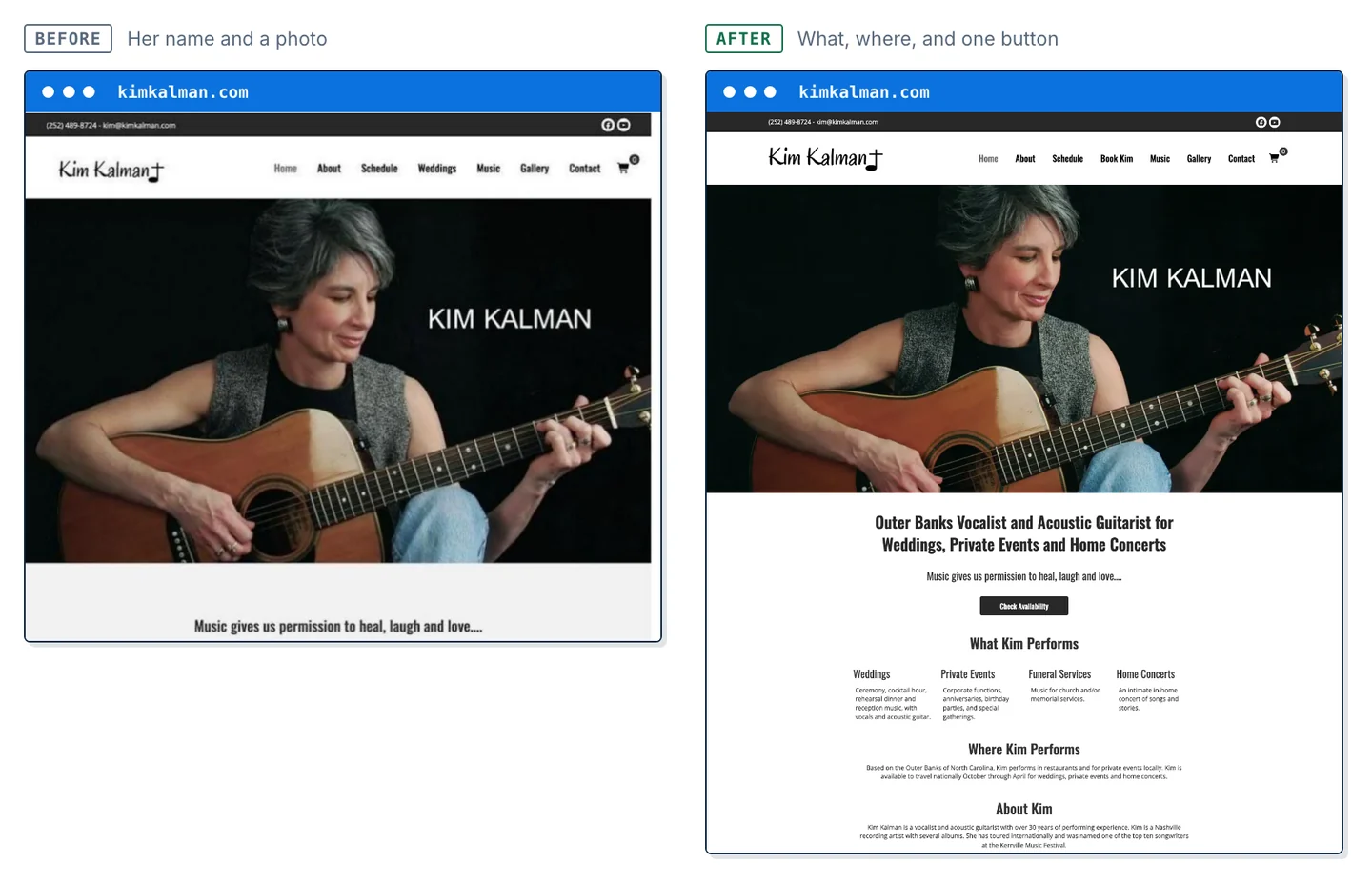
The new headline says exactly what she is and who it's for: "Outer Banks Vocalist and Acoustic Guitarist for Weddings, Private Events and Home Concerts". Her favorite line didn't go anywhere. It moved right under the headline, where it does its job as a feeling instead of a description. Then one button, Check Availability, that jumps straight to her inquiry form.
The order that works
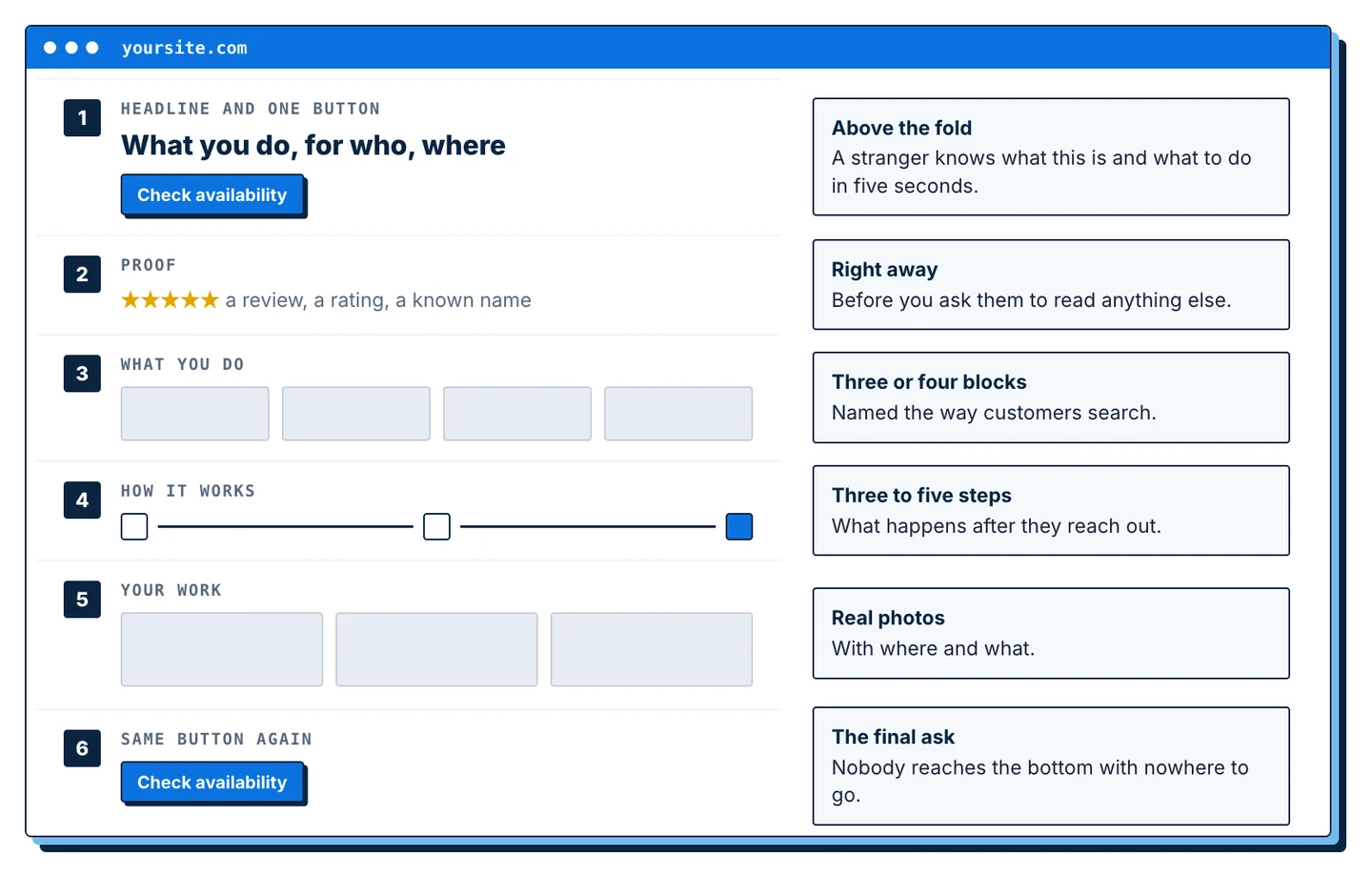
1. Headline and one button
What you do, who it's for, and where, in one line. Then one button that says what happens when they click it: "Check availability", "Get a quote", "Book a call". If you want the formula for the headline itself, it's in how to write website copy that turns visitors into customers.
2. Proof, right away
A review, a star rating, an award, a well-known client, or a number like years in business. Something that says "other people trusted this, and it worked out". Put it before you ask the visitor to read anything else.
3. What you do
Three or four short blocks, one per service, each named the way a customer would search for it. On Kim's page that's Weddings, Private Events, Funeral Services and Home Concerts, each with one line underneath. Each block links to more detail on the services page.
4. How it works, or where you work
A nervous buyer wants to know what happens after they reach out. Three to five short steps do that. For a local business, this is also the place to say where you work. Kim's page has a short "Where Kim Performs" section: based on the Outer Banks, and available to travel for events from October through April.
5. Your work
Real photos, real projects, real results. For a contractor that's finished jobs. For Kim it's her gallery and her music. Link to the full page, and keep the best two or three here.
6. The same button again
End with the same ask, plus one line that takes away a worry: "No obligation", "Reply within one business day". On Kim's page the inquiry form sits right here under a heading that says what it's for: "Check Kim's Availability".
What to leave off the home page
- A slider that rotates through five messages. Nobody waits for slide three.
- Your full company history. One line, and a link to the About page.
- Every service you've ever done. Pick the ones you want more of.
- Five different buttons. One action, repeated.
Don't forget the part Google reads
The page title and description are the first thing people see in search results. Kim's home page title is now "Kim Kalman | Outer Banks Wedding and Event Singer", which says her name, her place and what she does before anyone clicks. The on-page SEO checklist covers the rest.
Check your home page
Open your home page on your phone and give yourself five seconds. Do you know what the business does, where, and what to click? My free checklist has ten yes-or-no questions like that one.
The Website Gap Checklist
Find out in five minutes why your website isn't bringing in customers, and know exactly what to fix first so more visitors call, book and buy.
Your checklist is downloading.
Didn't start? Download the PDF here.
Rather have it checked for you? Run the free website gap checker on your site.