

A lot of website copy starts the same way: "Founded in 2009, we are a family-owned company committed to quality." It's true, and nobody cares yet. A visitor shows up with a problem. They want three answers fast: what is this, is it for me, and what do I do next.
Your copy has one job: answer those three before they leave. Below is the formula I use when I write or edit the words for a client's site, page by page, with real examples and a fill-in-the-blank template at the end.
Start with their problem, not your history
Before you write a word, write down the problem your customer has the day they find you. Not your service. Their problem. A pipe leaking at 9pm. A kitchen that doesn't fit the family anymore. A website that looks fine and gets no calls.
Then write every page as the answer to that problem. Your history, your awards and your team still matter. They just come after the visitor knows they're in the right place, as proof.
Here's the top of the site I built for Burke Black Design Build, a remodeler in Chicago. The headline names the three worries every remodel client walks in with: will it look good, will it blow my budget, and will it be built right.
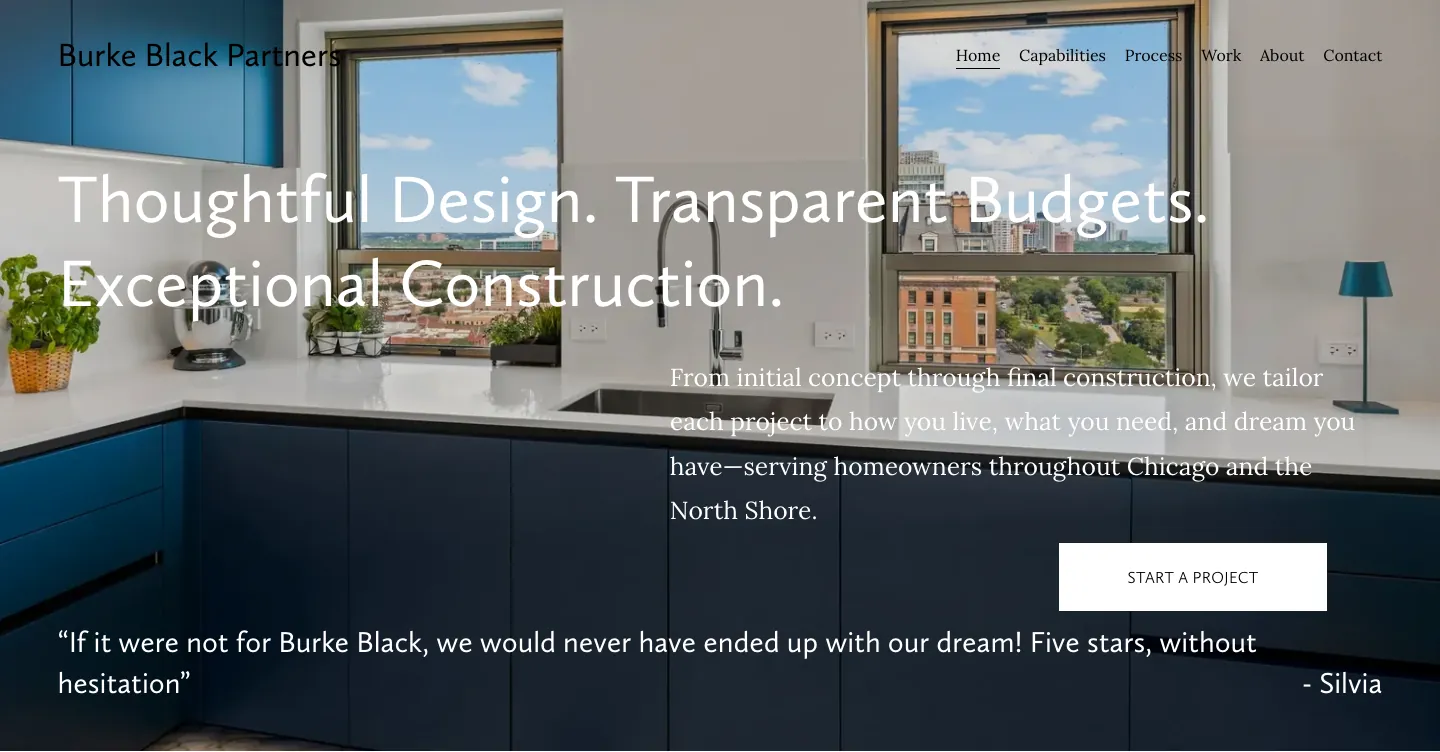
The headline formula: outcome, who it's for, and proof
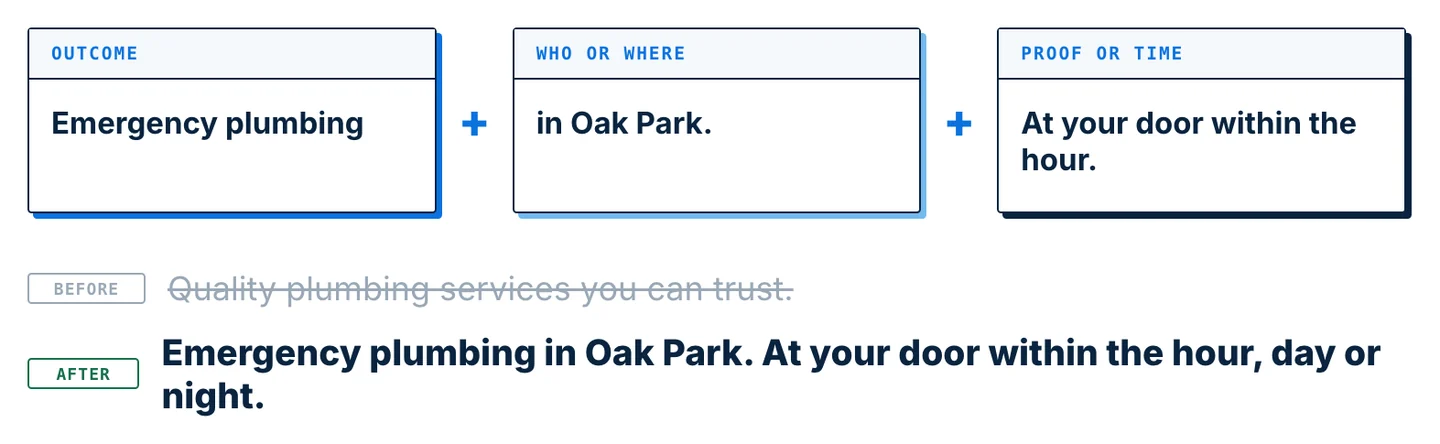
Your headline is the one line almost everyone reads. Most headlines say who you are. Make yours say what the customer gets.
- Outcome: what changes for them. A fixed leak, a finished kitchen, more calls.
- Who it's for: the kind of customer, or the area you serve.
- Proof or time: a number, a timeframe, or something only you can say.
A few before-and-afters:
- Before: "Quality plumbing services you can trust."
- After: "Emergency plumbing in Oak Park. At your door within the hour, day or night."
- Before: "Innovative web solutions for your business."
- After: "A custom website for your Chicago business, built in a day."
Then run the test: could a competitor put your headline on their site without changing a word? If yes, it isn't saying anything yet. Add the part only you can claim.
Give every page one job
Pick the one thing you want a visitor to do: call, request a quote, book or buy. Make it the most obvious thing on every page, with the same words every time.
On the Burke Black site the button says Start a Project at the top of the home page, under the list of services, and at the top and bottom of every project page. Nobody has to wonder how to get started. When there's one clear next step, people take it. When there are five, most take none.
Where to put it:
- In the first screen, before anyone scrolls.
- Right after your proof (reviews, results, past work), when trust is highest.
- At the end of the page, so nobody reaches the bottom with nowhere to go.
Write the button as what they get, not what they do. "Get my free quote" beats "Submit". "Start a project" beats "Contact us".
What goes on each page
Home page
Read it like a stranger, top to bottom. This order works for almost every small business:
- The headline and one button.
- Proof right away: a review, a rating, a known client or a number.
- What you do, in three short blocks, each named the way a customer would search for it.
- How it works, in three to five steps, so a nervous buyer knows what happens after they reach out.
- Your work, with real photos.
- The same button again.
Services page
Lead with the result, then what's included. For each service: who it's for, what they get, what it roughly costs or how pricing works, and the next step. One service, one section, each with its own heading. If one service is a big part of your business, give it its own page.
About page
Three short paragraphs and a real photo of you. Why you started, who you help, and why you're the right pick. That's enough. Mine, on the home page of this site, is exactly that, and it starts with "Hi, I'm Rowan." People hire people, especially from a small business. Let them see who they'll be talking to.
Contact page
Ask for what you need to have a useful first conversation, and nothing else. The Burke Black form asks what kind of project it is, a target budget range and a few lines about the vision. That one budget question saves both sides a call that was never going to work.
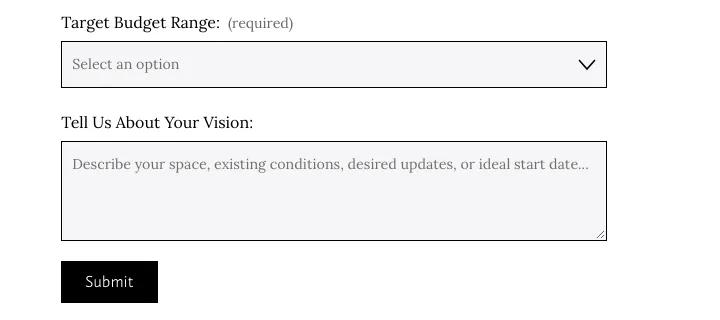
Then say what happens next and when: "I'll reply within one business day." A form with no promise feels like it goes nowhere.
Write like you talk
The best website copy sounds like you on a good day, explaining your work to a neighbor. A few rules I follow:
- Short sentences. If you need a breath to read it out loud, split it.
- Plain words. "Solutions", "leverage" and "best-in-class" say nothing. Say what you actually do.
- Their words, not yours. Read your reviews and old emails. Customers describe the problem better than we do, so borrow their phrasing.
- Specifics beat adjectives. "Licensed since 2009, 400 roofs replaced" beats "experienced and reliable".
- More "you" than "we". Count them. If "we" wins, rewrite.
Read every page out loud before it goes live. Anything you stumble on, your visitor will skip.
A fill-in-the-blank template for your home page
Copy this into a doc and fill in the brackets. Rough is fine. Get the structure right first and polish the words after.
- Headline: [The result] for [who you help] in [where], [proof or timeframe].
- Subheadline: We [what you do] so you can [what changes for them].
- Button: [Action] + [what they get], for example "Get my free quote".
- Proof: [Star rating, number of jobs, a short review with a first name, or a known client].
- What we do: [Service 1, named the way customers search for it], [Service 2], [Service 3], one sentence each.
- How it works: [First step and when], then [what happens next], then [what they end up with].
- Our work: [Two or three projects, each with where, what and a real photo].
- Final ask: [The same button], plus one line that removes a worry, like "No obligation. Reply within one business day."
Once the words are right, each page also needs to show up in Google for the right phrase. That's the on-page SEO checklist. And if you're still deciding which pages to write at all, start with what pages a small business website needs.
Check your copy against the checklist
Good copy covers most of my free website gap checklist: one clear job, proof where people decide, an easy first step. It's ten yes-or-no questions, and in five minutes you'll know where your words are losing people. Rather have it done for you? Run the free website gap checker on your site.
The Website Gap Checklist
Find out in five minutes why your website isn't bringing in customers, and know exactly what to fix first so more visitors call, book and buy.
Your checklist is downloading.
Didn't start? Download the PDF here.
Rather have it checked for you? Run the free website gap checker on your site.