

Most analytics setups fail the same way. Someone installs Google Analytics, opens it twice, and never looks again. A year later nobody remembers the login.
Here's my rule. If you're going to track something, track the numbers that change what you do. If a number can't change what you do, you might as well not track it at all.
The one-sentence test
Before you watch any number, finish this sentence: "If this drops, I will..."
If you can finish it, keep the number. If you can't, it's trivia. And trivia isn't free. It takes time to check, and it pulls your attention away from the numbers that matter.
Four numbers that pass
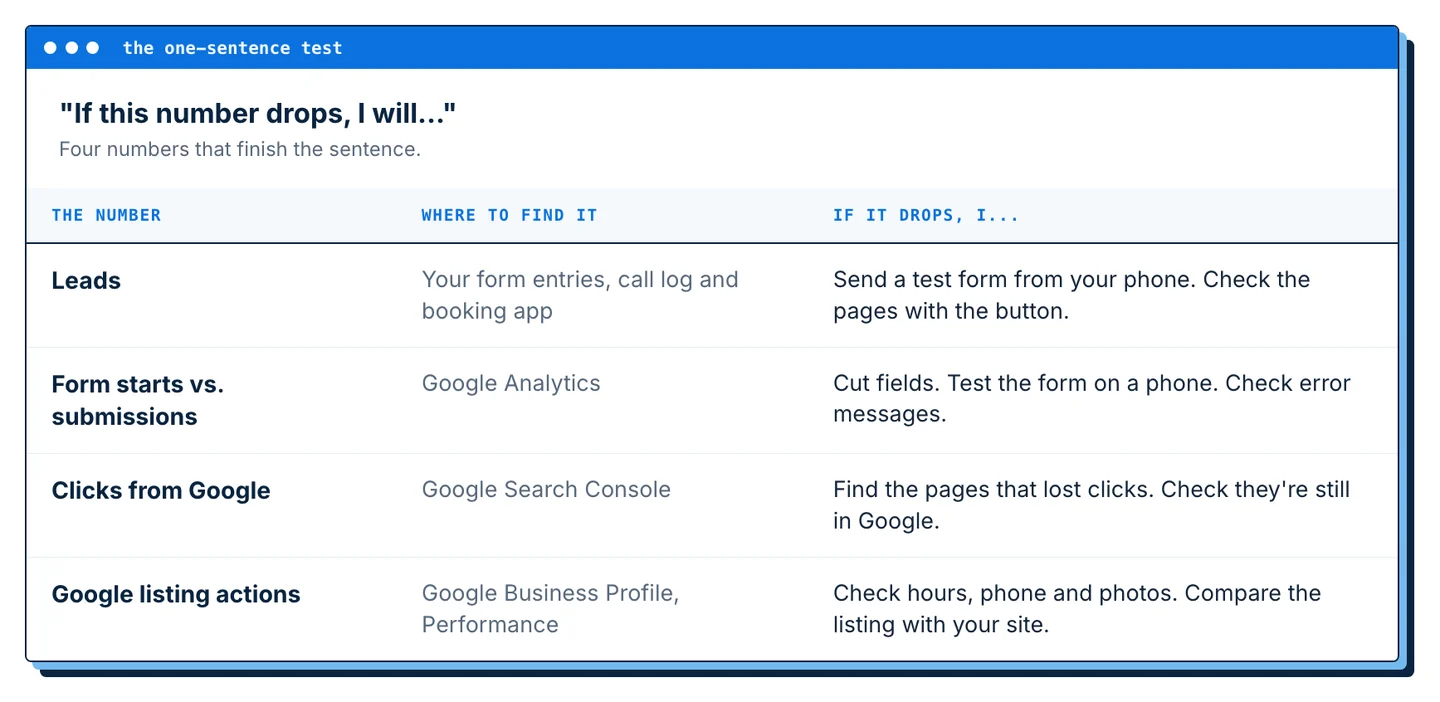
For most small businesses, four numbers pass the test. Each one comes with something specific to do when it drops.
1. Leads
Form submissions, calls and bookings that came through the website. This is the number the site exists for. If it drops, the first thing I check is whether the form still works. Send yourself a test from your phone. Then look at the pages with the button on them.
2. Form starts compared with form submissions
How many people started your form, and how many sent it. A big gap means the form is losing people who already chose you. Too many fields, a button that doesn't work on phones, or a question people don't want to answer. I wrote a whole post on the gap between form starts and form submissions.
3. Clicks from Google
How many people clicked through to your site from a Google search. This one comes from Search Console, not Analytics. If it drops, find the pages that lost clicks. A page that fell out of Google, or a page someone edited and broke, usually shows up there first.
4. Actions on your Google listing
Calls, website clicks and direction requests from your Google Business Profile. For a local business, the listing is often seen more than the website. If these drop, check that your hours, phone number and photos are current, and that the listing still matches your site.
A real example: twenty visitors and a won project
I built a new website and Google Business Profile for Burke Black Design Build, a custom home and condo builder in Chicago. Over three months, about twenty people visited the site. Around 75 people looked at the Google listing.
If you only watched visitors, that looks like nothing happened. Twenty people in three months.
The other numbers told a different story. Two people filled in the form to ask about working with them. The owner sent a prospective client to the Work page and won the project. And the listing was seen almost four times as often as the website.
So for Burke Black, the numbers worth watching are leads and the Google listing. Visitors can sit in the background. The full case study has the rest.
Count your first step too
Some businesses have a smaller action that comes before a lead. On the Iroquois yacht site I built, it was a spec sheet download. 216 people downloaded it, which told the broker real people were interested long before anyone filled in the inquiry form.

If your site has a download, a quote tool or a newsletter signup, count it. It's the early warning that your leads are about to move, one way or the other.
How often to look
Once a month is enough for most small businesses. Same day each month, about ten minutes. Weekly numbers on a small site jump around too much to mean anything. Two form fills one week and none the next is just a quiet week.
Then write down one thing you'll do because of what you saw. If you never write anything down, you're looking at numbers, not using them. Here's the order I read a monthly report in.
What to do with your own site:
- List every number you check now, and run each one through the one-sentence test.
- Make sure leads are actually being counted. Send a test form and check the count went up.
- Put a monthly reminder in your calendar, and write down one action each time.
If you'd rather not log in to three Google tools every month, our Analytics Reports put these numbers in one short report in your client portal.
Not sure your site gives people one clear action to count? The free checklist covers that in ten yes-or-no questions.
The Website Gap Checklist
Find out in five minutes why your website isn't bringing in customers, and know exactly what to fix first so more visitors call, book and buy.
Your checklist is downloading.
Didn't start? Download the PDF here.
Rather have it checked for you? Run the free website gap checker on your site.