

Your services page is where someone decides whether you do the thing they need. Most services pages are a list of what the business does, written for the business. A good one is written for the buyer: what they get, whether it's for them, and how to take the next step.
Here's how to structure it, with a real before and after.
A real before and after
Kim Kalman, an Outer Banks singer and guitarist, had a page called Weddings. It was a lovely page about weddings, and that was the problem: she also plays private events, memorial services and home concerts, and none of them had a home on her site.
We renamed it Book Kim, gave it a headline that names all four services, and gave each service its own section ending in a Check Availability button.
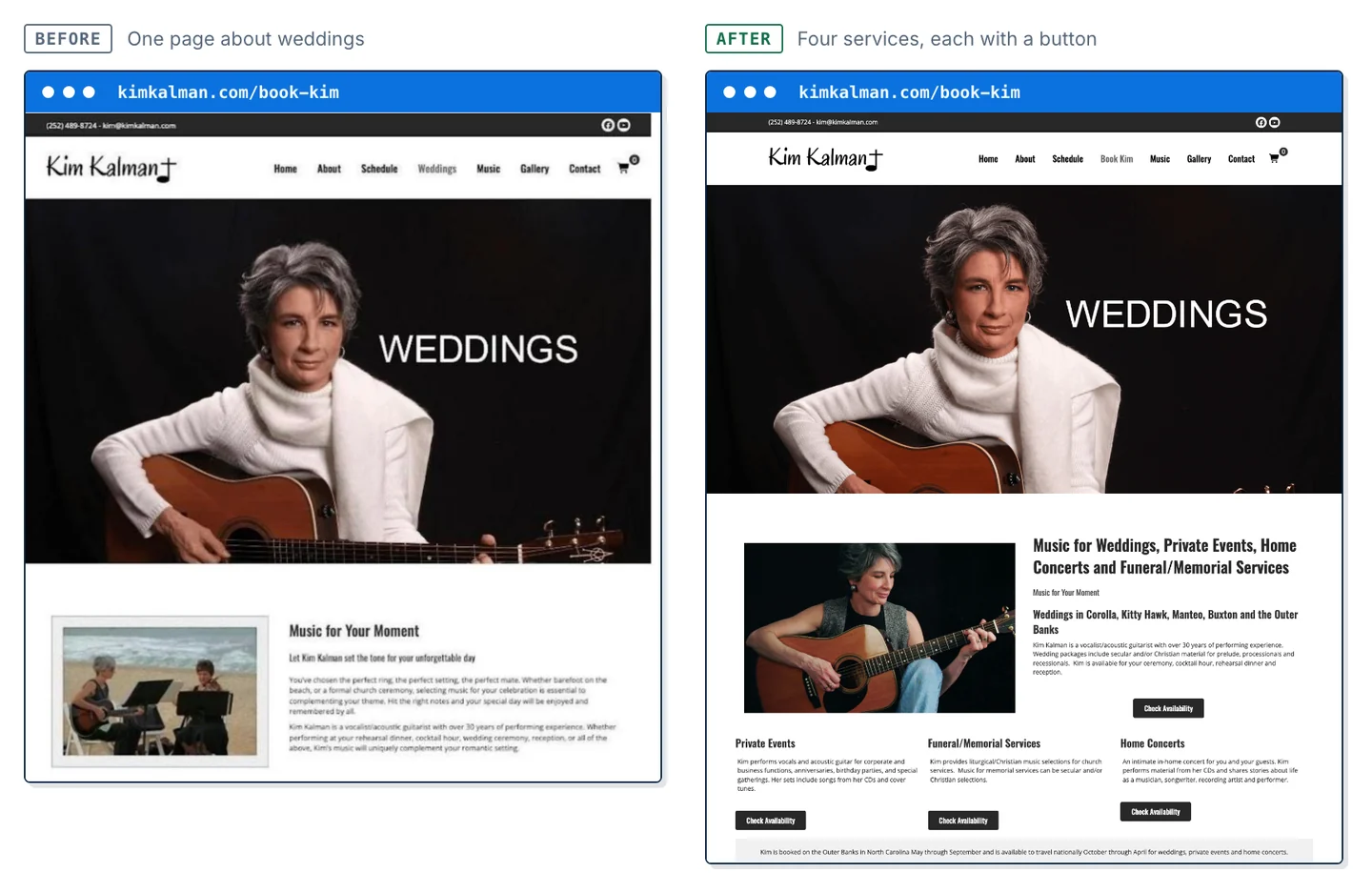
The wedding section now names the towns where she plays: "Weddings in Corolla, Kitty Hawk, Manteo, Buxton and the Outer Banks". The heart of her wedding copy stayed. It just has a heading that Google and a bride can both understand.
One section per service
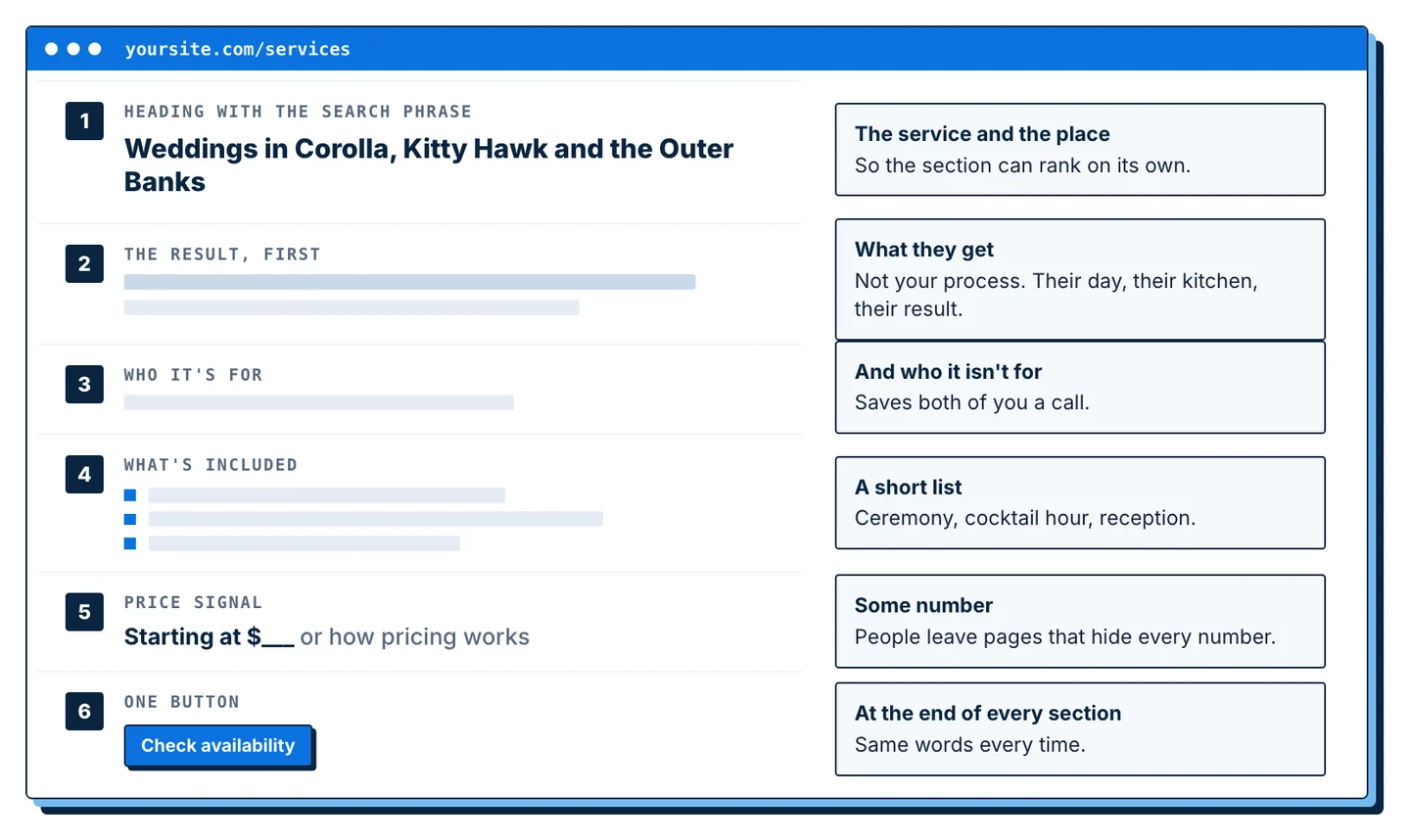
Give each service its own heading, and make that heading the phrase a customer would search: the service plus the place. Then fill in the same five things for each one.
Lead with the result
Start with what the customer gets, not your process. "Music for your ceremony, cocktail hour and reception" beats "I have over 30 years of experience". The experience matters, as proof, one line later.
Say who it's for, and who it isn't
"For couples getting married on the Outer Banks" or "for homeowners renovating a condo in an older building". If there's something you don't do, say so. It saves both of you a call.
List what's included
Three to six short bullets. Concrete things, not adjectives.
Give a price signal
You don't have to publish a price list. But some number, or at least how pricing works, keeps people from leaving to find a competitor who will tell them. "Packages start at", "most projects land between", or "priced by the hour, two-hour minimum" all work.
End with a button
Every section ends with the same button. The person who just read about memorial services shouldn't have to scroll back to the top to ask about a date.
When to give a service its own page
One page with a section per service is fine to start. Give a service its own page when it's a big part of your business, when you want it to rank in Google on its own, or when there's simply too much to say in a section. Burke Black Design Build has a page for each kind of work, like kitchens, bathrooms and condo gut rehabs, because each one is a different search and a different buyer.
Don't forget the page title
Kim's Book Kim page is titled "Book Kim | Outer Banks Weddings, Events and Home Concerts", with a description that names her four towns. That's what shows in Google before anyone clicks. More on that in the on-page SEO checklist, and on picking the right phrase in local keyword research.
Mistakes I see a lot
- One giant paragraph covering every service.
- Service names only your industry uses.
- No price signal at all, anywhere.
- A single button at the very bottom of a long page.
- Services you don't actually want more of, listed first.
Still deciding which pages your site needs at all? Start with what pages a small business website needs.
The Website Gap Checklist
Find out in five minutes why your website isn't bringing in customers, and know exactly what to fix first so more visitors call, book and buy.
Your checklist is downloading.
Didn't start? Download the PDF here.
Rather have it checked for you? Run the free website gap checker on your site.