

Every business owner wants to know which marketing works. Most are guessing. Not because the answer is hard to get, but because nobody asked.
You can know where your customers came from with one question and two free Google reports. No new software.
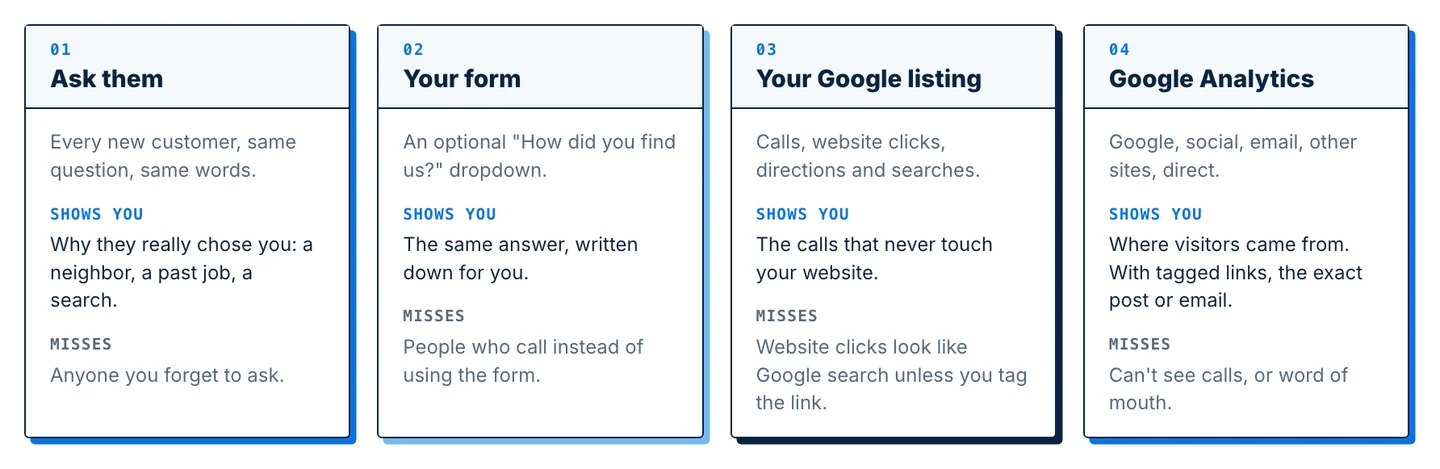
1. Ask every new customer the same question
"How did you find us?" Ask it on the first call, every time, in the same words. Write the answer in the same place every time, whether that's a spreadsheet, a notebook or your CRM.
This is the most accurate source you'll ever have. Analytics can tell you someone came from Google. Only the customer can tell you a neighbor recommended you, and then they searched your name to find the number.
Write down what they say, not a category you squeeze it into. "Saw your truck on our street" is more useful than "other" when you look back in a year.
2. Put the same question on your form
Add it to your contact form as a short dropdown with your real sources and an Other option. Google search, Google Maps, a friend or neighbor, a past customer, Instagram, Other.
Keep it optional. Every required field costs you some people who would have sent the form. I wrote about that in form starts vs form submissions.
3. Check your Google Business Profile
For a local business, the Google listing is often seen more than the website. Burke Black Design Build, a Chicago custom home builder I set up a site and listing for, is a good example. Over three months, around 75 people looked at their listing and about twenty visited their website.
Your Business Profile shows how many people called you, asked for directions or clicked through to your website from the listing, and which searches showed it. Those calls never touch your website, so Google Analytics can't see them. If you only look at Analytics, you miss them completely.
4. Check where your website visitors came from
Google Analytics groups visitors by where they came from: Google search, social media, other websites, email, and direct.
Here's what that looked like for the Iroquois yacht site I built. People arrived from six places: direct visits, Google, three social networks and the yacht designer's own website.
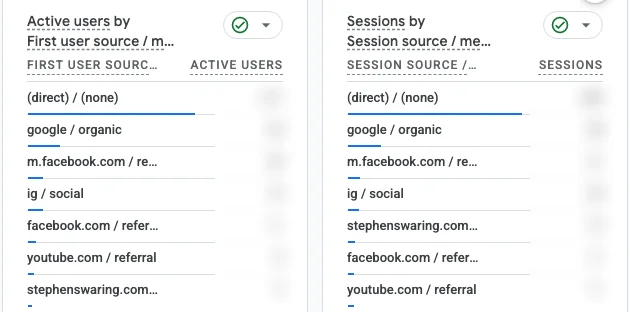
The list matters less than the next question: which of those sources sent people who took a step? A form, a call, a download. A source that sends lots of visitors and no leads is noise.
Tag the links you share
When you post a link on social media, in an email or on your Google listing, you can add a short tag to the end of it. Analytics then shows exactly which post or email sent the visit, instead of lumping it in with everything else.
Google's free Campaign URL Builder writes the tag for you. You fill in where the link will be shared and what it's for, and it gives you the full link to paste.
The first link I'd tag is the website link on your Google Business Profile. Without a tag, clicks from your listing usually look like ordinary Google search in Analytics, and you can't tell the two apart. There's more on tagging in what small business owners should actually track.
Put it together once a month
Once a month, line up three things: what customers told you, what your Google listing shows, and what Analytics shows. When all three point the same way, you've found what's working. Do more of it.
When they disagree, trust your customers. Analytics sees clicks. Customers tell you why they called.
What to do with your own site:
- Pick the question and the exact wording, and ask every new customer starting this week.
- Add the same question to your form as an optional dropdown.
- Tag the website link on your Google Business Profile.
Our Analytics Reports put your Analytics, Search Console and Business Profile numbers into one monthly report, so the Google side of this takes minutes.
Does your Google listing match your website? That's one of the ten questions on the free checklist.
The Website Gap Checklist
Find out in five minutes why your website isn't bringing in customers, and know exactly what to fix first so more visitors call, book and buy.
Your checklist is downloading.
Didn't start? Download the PDF here.
Rather have it checked for you? Run the free website gap checker on your site.